Home > Dell Laptop Batteries > Dell inspiron E1505 battery

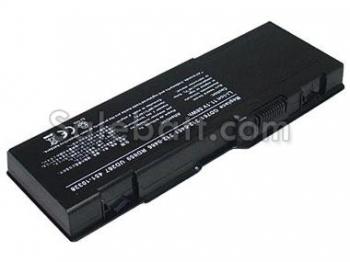
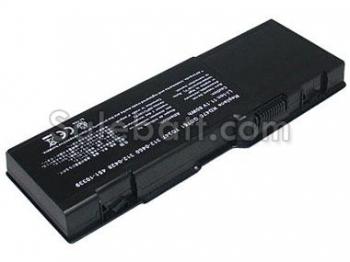
Replacement for Dell inspiron E1505 battery 7200mAh 9 Cell li-ion battery

dell e1505 battery

Replacement battery for Dell inspiron e1505(7200mAh, 11.1V)

dell e1505 battery dell inspiron e1505 battery
dell inspiron 1501 battery email to a friend contact us
  • Brand new 9-Cell extended capacity replacement Dell inspiron E1505 batteries
  • The 9-cell 7200mAh 11.1V Li-Ion Dell inspiron E1505 battery for those users needing extended battery life. With Vista's power management running in "high performance" mode, screen brightness set to maximum and wireless on, the replacement Dell inspiron E1505 battery delivered long battery life. Rechargeable laptop Battery for Dell inspiron E1505. Compatible Part Numbers: Dell GD761 , Dell KD476. Compatible with the following: Dell inspiron e1505, inspiron 6400, inspiron 1501.
  • Item name: Dell inspiron E1505 Battery
    Availability: In Stock
    High Quality Battery See Details

Cheap Dell Replacement Battery for Dell inspiron E1505

  • Specifications:
  • Chemistry:Li-Ion
  • Capacity: 7200mAh
  • Volts: 11.1V
  • Color: Black
  • Size:209.40*71.80*19.80mm
To get maximum use out of your Dell inspiron E1505 laptop battery there are a few things to keep in mind:

1) Avoid frequent full discharges because this puts additional strain on the Dell inspiron E1505 battery. Several partial discharges with frequent recharges are better for lithium-ion than one deep one. Recharging a partially charged lithium-ion does not cause harm because there is no memory. (In this respect, lithium-ion differs from nickel-based batteries.) Short battery life in a laptop is mainly cause by heat rather than charge / discharge patterns.

2) The Dell E1505 Batteries with fuel gauge should be calibrated by applying a deliberate full discharge once every 30 charges. Running the pack down in the equipment does this. If ignored, the fuel gauge will become increasingly less accurate and in some cases cut off the device prematurely.

3) Keep the lithium-ion battery cool. Avoid a hot car. For prolonged storage, keep the Dell Inspiron E1505 battery at a 40% charge level.

4) Consider removing the Dell E1505 battery from a laptop when running on fixed power. (Some laptop manufacturers are concerned about dust and moisture accumulating inside the battery casing.)

5) If you have a spare lithium-ion battery, use one to the fullest and keep the other cool by placing it in the refrigerator. Do not freeze the battery. For best results, store the brand new Dell inspiron E1505 battery at 40% state-of-charge.

Payment and Shipping

We accept credit card payment through PayPal payment system.

Our rates include the expenses of shipping, handling and the high quality packaging. Shipping fee within continental United States would be USD9.99

Most of the items we carry are in stock and will be shipped on the next 2 business days you place your order. Orders placed on Saturday and Sunday will be shipped on next Monday. Your order will be delivered to the shipping address within 5 to 10 business days after being shipped out. (Note: business days are Monday through Friday. Saturdays, Sundays and national holidays are excluded). If the items you ordered are out of stock, we will contact you by email or telephone.

We also suggest
  1. acer aspire one battery
    Acer Aspire One battery
    hot batteries
  2. lenovo thinkpad t61 battery
    Lenovo ThinkPad T61 battery
    hot batteries
  3. dell latitude d620 battery
    Dell Latitude D620 battery
    hot batteries
  4. hp pavilion dv9000 battery
    Hp Pavilion DV9000 battery
    hot batteries
dell inspiron E1505 battery